← FoundationsDraft for review · Envision Group

Menu boards that sell

The digital menu board is the last thing a guest reads before they order, and the kiosk is often the first thing they touch. These are the practices Envision builds into every board and kiosk screen, with the data behind them and examples to copy.

At Levy concessions, venues that refreshed their boards this way ran 12 to 17% above per-cap budget. The numbers are in the data section. Envision's own tests are listed at the end.

2017Levy's Design Strategy & Standard Guide for Digital Menu Boards set the starting rules: the hot spot, readable at 10 feet, bundles in the centre.
2026Mercatino and San Marzano boards put those rules into Envision stations and added the upsell zone, the grid widget and the portrait bottom panel.
NextBefore-and-after sales tests on Envision's own boards and kiosks, listed at the end of this guide.

Anatomy of a 1920 × 1080 board

Scroll sideways to see the whole board.

Every item: name, one-line description, calories, priceFeatured item: the highest-margin item, top of the right columnRight third, the upsell zone: combos, add-ons, size-ups and LTOs that raise average check and basket sizeBased on: Foundations station menus (Grill House, Pizza House)

Part 1

The basics

A board only sells if a guest can read it from the queue. The rest of the guide depends on these two.

Practice 1

Readable from the back of the line

Speed of serviceAccessibility

These rules come from the 2017 guide and still decide whether a board works. A board that can't be read from the queue doesn't sell.

  • Every item name and header readable from at least 10 feet from the counter.
  • Upper and lower case together. All caps reads as blocks rather than words.
  • Strong contrast between text and background, to WCAG levels. Brand colours plus one accent colour.
  • Photos and video take no more than about 65% of the board. Past that, the eye goes to the text first and the images lose their pull.
  • Food before drinks: food on the left or first, beverages on the right or last.
  • Don't repeat the station name on the board if the station sign above already says it. Use that space for menu items.
Rogers Place Grab a Cold One board with four drinks at 18.50 and a Domestic Draft feature in the right third
Rogers Place. Four drinks, each with a photo, a name and one price in large type. The right third features one of them.
Tundra Grill screen for the Wagyu Smash Burger at 15.00 with a Make it a combo +6.50 badge
Tundra Grill, Park Hospitality. One item per screen: the name, one line of description and a price that reads across the room.

Practice 2

Design for speed to order

Speed of serviceGuest satisfaction

A board that is quick to read moves the line. Every board uses the same order and the same few signals, so a guest who has read one of our boards can read them all.

  • Category header first, then item, price and calories in the same order on every board.
  • Real food photography at a consistent angle and scale.
  • One "Top Pick" or "Best Seller" badge per board to guide undecided guests.
  • Dietary icons from the F24 Menu Icon Implementation Guidelines, never decorative ones. Allergens are shown as "Made Without" claims, not a "Contains" list.
  • Calories and the daily-intake statement on every item where provincial rules require it.
Eurest omelette bar board with three numbered build steps and a Make it a combo for +$5.50 panel on the right
Eurest, Health Sciences North. Build-your-own omelette in three steps, with the starting price under the heading and the combo offer in the right third.
RBC portrait board for Build Your Own Bowl in six numbered steps
RBC. Build-your-own bowl on a portrait screen in six numbered steps, each saying how many to choose.

Part 2

Selling

Where the offer goes on the board, and how it behaves.

Practice 3

Give the right third to the upsell

Average checkAttach ratePer cap

Every horizontal board now reserves its right third for selling, not listing. We build it as a 1080 × 1920 vertical panel and scale it into the rightmost third of the 1920 × 1080 screen, so the same artwork also runs on a portrait screen with no rebuild.

We call it the upsell zone. It is there to raise the average check and grow the basket, so it rotates between combos, add-ons, size-ups, a hero product shot and the current LTO. It never repeats an item the menu already prices; its job is to add something to the order.

Good Vibes Grill smash burger board with a Combo it +5.00 panel showing fries and a Coca-Cola in the right third
Good Vibes Grill (F27). The right third is one combo offer: fries and a drink for +5.00.
San Marzano classic pizzas board with a Make it a Combo panel showing chips and a Coca-Cola in the right third
San Marzano, Ontario (F27). Right third carries the combo: chips and a can for + 4.00.
San Marzano pizza slices board with a hero pizza photo in the right third and a combo widget in the grid
Same board, next rotation. Right third switches to a hero shot; the combo moves into the grid.
Levy All Star Eats Hot Honey Popcorn Chicken full-screen board at 12.99
Levy, All Star Eats. The same LTO built as a full screen, left, and as a 1080 × 1920 panel for the right third of a menu board, right.
The same Hot Honey Popcorn Chicken offer as a vertical 1080 by 1920 panel
Right-third panel. Runs alone on a portrait screen too.

Practice 5

Never leave a grid slot empty

Basket sizeAttach rate

Menus rarely fill a grid exactly. A six-slot grid (two columns, three rows) with five items leaves a gap. We fill that slot with a widget: a combo, an add-on, a drink or a dietary swap, styled to sit inside the grid so guests read it as part of the menu.

  • Match the slot's size and alignment so the grid stays intact.
  • Outline or tint it in the accent colour so it reads as an offer, not an item.
  • One action, one price: "Make it a combo + 4.00".
San Marzano board where the sixth grid slot holds a Make it a combo widget with chips and a Coca-Cola
San Marzano. Five pizzas in six slots. The sixth slot holds the combo widget.
Roots and Seeds board with whole bowls, six build steps and a Need a snack box under the food photos
Roots + Seeds. The "Need a snack?" box fills the space under the photos, tinted in the brand green and priced like the rest of the menu.

Practice 6

On portrait screens, the bottom panel sells

Attach ratePer capLTO sell-through

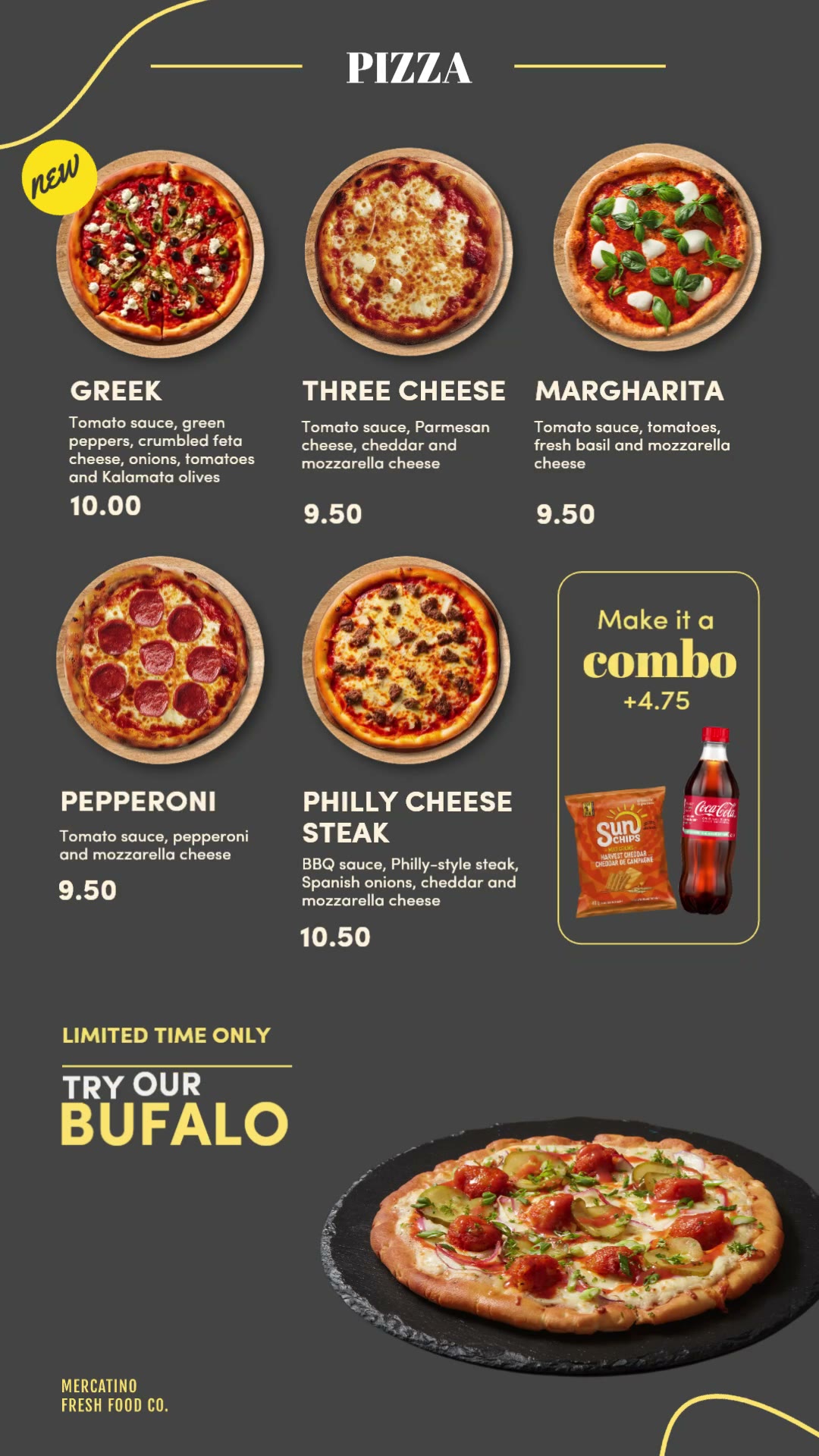
Portrait (1080 × 1920) boards follow the same logic. The top of the screen lists the menu. The bottom third rotates through an LTO, a drink add-on or a swap that keeps a guest who might walk away. Mercatino runs this across every category, with a "Top Pick" badge steering the first choice.

Mercatino pizza board with a Top Pick badge, a combo widget in the grid, and a Supreme Mac Pizza LTO in the bottom panel
Mercatino pizza. Combo widget in the grid, LTO in the bottom panel.
Mercatino wraps board with a Turn any wrap into a salad panel at the bottom
Mercatino wraps. "Turn any wrap into a salad" catches the guest who wants something lighter.
Mercatino bowls board with an Add a drink +2.19 panel showing bubly cans
Mercatino bowls. "Add a drink + 2.19": a single, priced add-on.

Practice 7

Animate the offer, not the menu

AttentionLTO awareness

Motion catches the eye in a queue. We animate the panels that sell (the right third, the bottom panel, the combo widget) and keep the price grid still, so the menu stays easy to read while the offer moves.

  • Animate one zone at a time. If the whole board moves, nothing stands out.
  • Loop in 10 to 15 seconds so a guest sees the full cycle while waiting.
  • Never animate prices or calories.
Mercatino portrait loop (12 s). The offer in the bottom panel animates. The grid stays still.
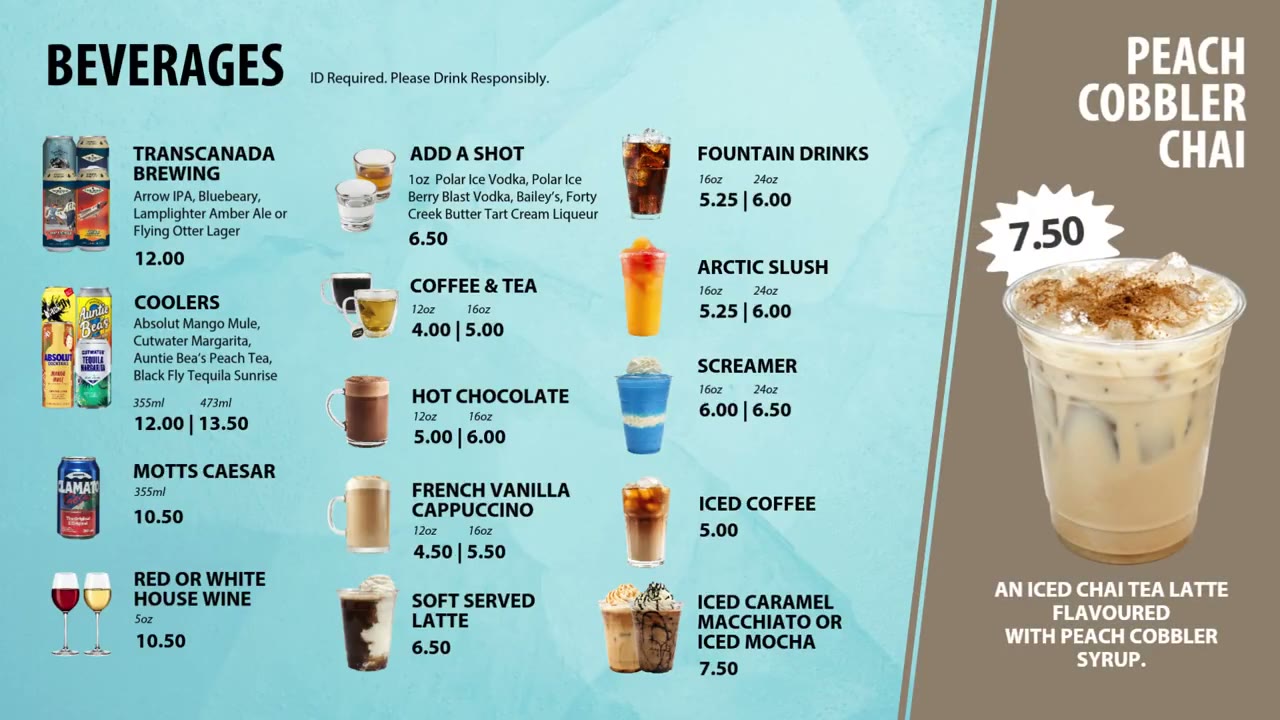
Tundra Grill beverages (10 s). The drinks list holds still. The right third alternates two featured drinks, each with its own price.
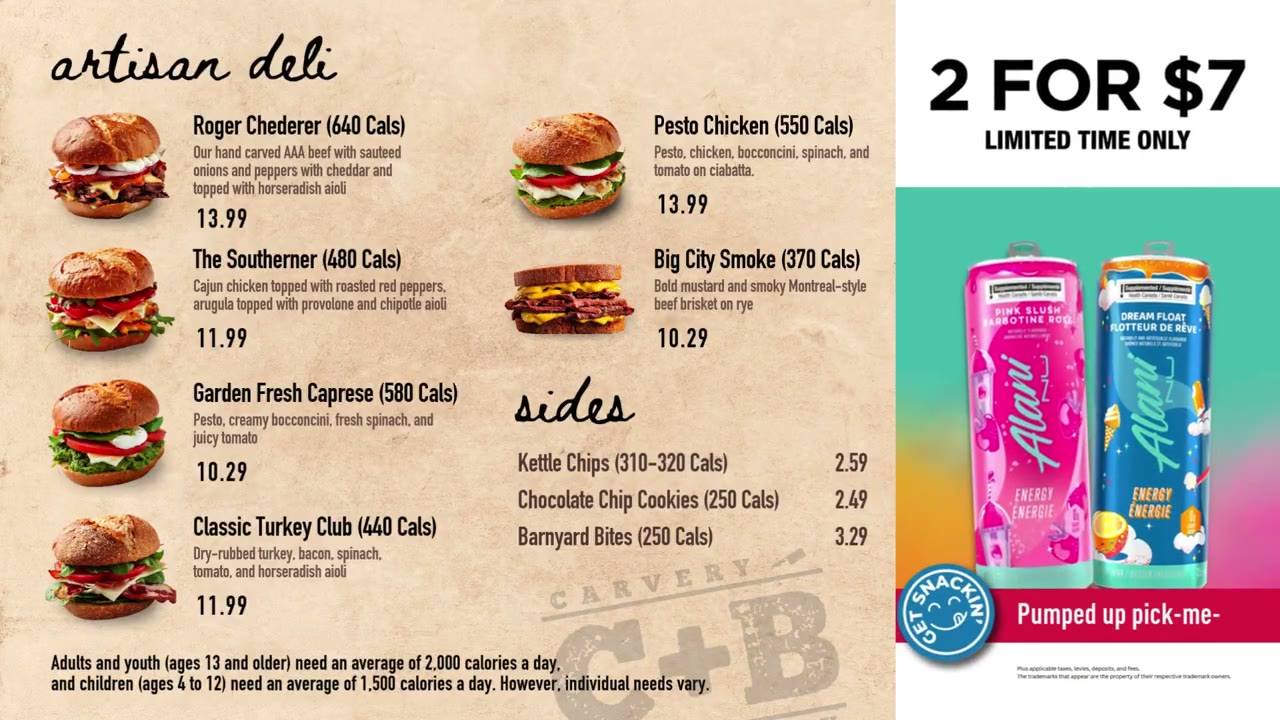
Carvery + Bakery deli (5 s). The sandwich grid holds still while the "2 for $7" offer builds in the right third.

Part 3

Trust

What the guest sees on the board, the kiosk and in photos has to match what they get.

Practice 8

Keep prices and items current

Guest trustSpeed of service

A price that doesn't match the till, or a sold-out item still on screen, costs guest trust and slows the line.

  • Prices and sold-out items come from the POS where the system allows it, not from a designer's copy.
  • Day-part the board: breakfast items leave the screen when breakfast ends.
  • Schedule LTOs and promotions to start and stop on their own dates.
  • Review the board on site before it goes live, then check sales after and adjust. A board is not a one-time install.
Levy CN Centre Hot Eats board labelled 11am onwards, with eight items in a grid
Levy, CN Centre. The heading says when the menu applies: "Hot Eats, 11am onwards". The board changes with the day part instead of listing everything all day.

Practice 9

Kiosks follow the board

Average checkSpeed of serviceOrder accuracy

More of our stations now take orders through self-serve kiosks, from Algonquin's marketplace to Bubbz. The kiosk follows the same rules as the board, because a guest often reads the board in line and finishes the order on the screen.

  • Same names, same order, same prices and calories as the board. A guest should never wonder whether the kiosk item is the board item.
  • Real product photos, cut out cleanly from their backgrounds and true to what is served, at one angle and scale so the menu reads as a set.
  • The idle screen does one job: one hero image and one clear "Tap to order". Proposed
  • One upsell, at the moment it makes sense: the combo or drink prompt plays the part of the board's upsell zone, not a pop-up on every screen. Proposed
  • Large, well-spaced buttons, with the main actions within easy reach for every guest, including from a wheelchair. Proposed
  • Signage closes the loop: where a station is kiosk-only, the wobbler says so ("Pre-order, pre-pay station, please order through the kiosk").
Rogers Place Breakaway Grab and Go self-checkout signs numbered Place, Space and Pay
Rogers Place, Breakaway Grab & Go. Self-checkout signage in three numbered steps: place, space, pay. The side panels point guests to drinks on one side and snacks on the other.

Practice 10

AI images: start from the real dish

Guest trustBrand standards

We use AI to make food images look their best, but a guest who orders what they saw expects to get it. Wherever we can, we start from a real photo of the dish and use AI to enhance it. Every AI image gets a designer's check before it goes on a board: it has to look like the dish the kitchen serves, and nothing in it can look wrong.

Do

  • Start from a real photo of the dish wherever one exists.
  • Use AI to improve lighting, colour, plating and background, or to cut the dish out cleanly.
  • Check every result against the real dish, and look closely for warped food, extra fingers, melted cutlery and other artifacts.
  • Use AI for backgrounds, textures and concept comps before a shoot.
  • Keep brand colours, fonts and logos as the source of truth, and follow the brand's approval process.
  • Keep a record of what was generated, and label AI images as AI wherever they're shown outside the board.

Don't

  • Show an item the kitchen doesn't make, or a version of it the guest won't get.
  • "Enhance" food photos past what the kitchen serves: no extra toppings, bigger portions or fake steam.
  • Generate logos, prices, calories, allergen or dietary icons, or any legal text.
  • Generate people who look like real staff or guests.
  • Let AI write text inside an image. Set all text as type.

The data behind it

Why we build boards this way

The strongest numbers we have come from Levy venues, where this approach started. They are why the same rules now apply across Envision.

+12–17%

Per cap vs budget at Levy concessions after the WAND digital menu boards and E15 strategy refresh.

Levy, Refresh Before & Afters
70/30

Levy's F27 combo strategy: best-selling entrée + beverage + snack, featured prominently on digital menu boards.

Levy FY27 Marketing Plan
42%

of snack occasions include a beverage: the case for drink add-ons on every board.

Levy FY27 Marketing Plan
90%

of guests say "delicious and good value" matters most in a menu item. "Too expensive" is the top barrier, so combos frame value.

Levy FY27 Marketing Plan

The 2017 guide adds two findings from earlier research: bundles placed in the centre of the board sold 15% more than bundles at the edges, and bundling can cut order time roughly in half. Levy has since named digital menu boards, combos and upselling among its strongest F26 initiatives.

What we'd measure next

Closing the data gap

For Envision's own brands, such as San Marzano and Mercatino, we have the designs but not the before-and-after sales. These tests would give us our own numbers, on boards and on kiosks.

TestCompareMeasure
Right-third comboCombo panel vs hero image only, 4 weeks eachCombo attach rate, average check
Grid widgetWidget in the empty slot vs a blank slotAdd-on units per transaction
MotionAnimated vs static offer panelLTO units sold
Portrait bottom panel"Add a drink" vs "Swap to salad" rotationBeverage attach, basket size
Kiosk upsell promptOne combo prompt at checkout vs noneCombo attach rate, order time

Sources

  1. Levy, Design Strategy & Standard Guide for Digital Menu Boards (2017): hot spot, navigation, space allocation, 10-foot readability, the 65% image limit, bundling research.
  2. Envision, Digital Menu Board Design: Best Practices & Future Trends (draft): layout, pricing, accessibility, content management.
  3. Levy, Refresh Before & Afters (PGCCC RFP imagery, Nov 2024): WAND Digital Menu Boards & E15 Strategy + Concession Refresh, +17% and +12% per cap vs budget.
  4. Levy Canada, FY27 Marketing Plan (Aug 2026): F26 programming insights, F27 stop/start/continue, Per Cap Push, CPG snacking.
  5. E15 Innovation Reports, Higher Ed snapshots (Sept 2024), corp-services-e15 SharePoint.
  6. San Marzano Ontario Coke-Can boards, F27 (Canva). Mercatino DVert 1080 × 1920 boards and loops (2026).
  7. Menu Icon Implementation Guidelines F24 (Envision).
  8. Board examples: Good Vibes Grill (F27), Roots + Seeds and Carvery + Bakery; Rogers Place; RBC; Tundra Grill (Park Hospitality); Eurest at Health Sciences North; Levy All Star Eats and CN Centre; Foundations Grill House template.
  9. Bubbz and Algonquin kiosk work (2026): kiosk photo approach and kiosk wayfinding copy.

Still to confirm

  • The E15 study behind the +12% and +17% per-cap figures: which venues, what period, and what else changed in the refresh.
  • The E15 Higher Ed snapshots (source 5) have not been reviewed yet.
  • Kiosk practices marked Proposed are suggestions, not yet Envision standard.